

In modern cloud engineering, building a new Docker image every time a developer pushes code to a repository can lead to massive storage costs, cluttered registries, and wasted pipeline minutes—especially if the changes were just to documentation, README files, or non-technical assets.
A production-grade CI/CD pipeline should be intelligent. It should continuously monitor Bitbucket, inspect the exact changeset (the specific files modified in a commit), and only trigger a new Docker build if the underlying application code or configuration files have actually changed. When a change is detected, the system must automatically generate a new, immutable version tag and store the artifact securely in AWS ECR (Elastic Container Registry).
Here is a comprehensive guide on how to implement this smart, automated container versioning workflow using Bitbucket and Jenkins.
1. Architectural Overview in Layman’s Terms
To understand how we automate and optimize this build cycle, let’s look at the core components using everyday analogies:
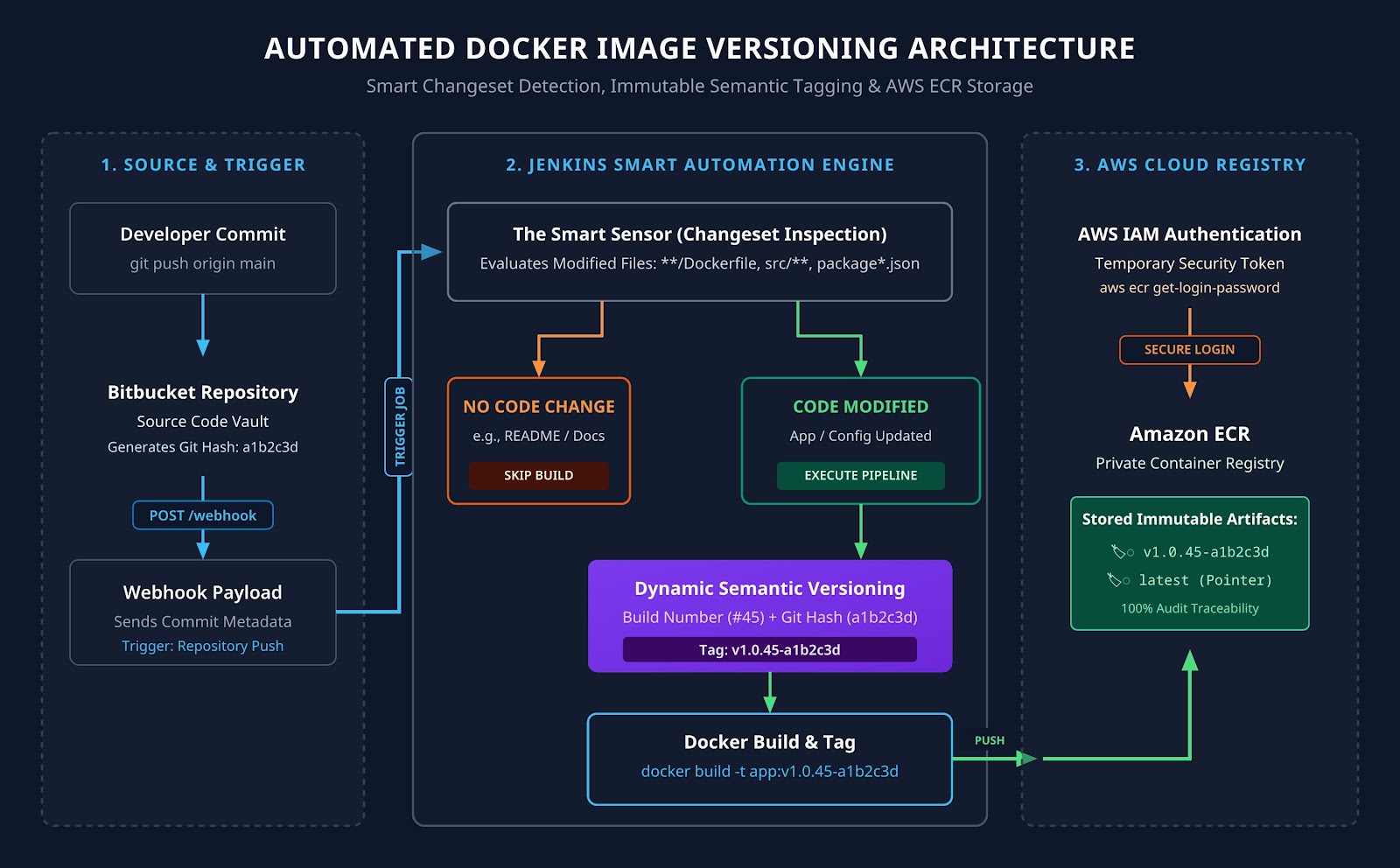
- Bitbucket (The Digital Vault): This is where your development team collaborates and stores their source code. Whenever a developer modifies a file and saves (“commits”) their work, Bitbucket creates a permanent ledger entry showing exactly which lines of code and files were touched.
- Changeset Detection (The Smart Sensor): Instead of blindly triggering a heavy manufacturing process every time a developer saves a file, Jenkins uses a smart sensor. It reads the Bitbucket ledger to see what changed. If someone just fixed a typo in a Word document or README, the sensor ignores it. If someone modified the Dockerfile, package.json, or backend source code, the sensor fires the assembly line.
- Jenkins & The Jenkinsfile (The Assembly Line): Once triggered by the sensor, Jenkins acts as a robotic assembly line. It reads the Jenkinsfile blueprint, assigns a unique production version number to the update, builds the new Docker container, and runs security checks.
- AWS ECR (The Secure Warehouse): Think of Amazon Elastic Container Registry as a secure, highly organized distribution warehouse. Jenkins delivers the newly built and uniquely tagged shipping container here, making it immediately available for your AWS cloud servers to pull and deploy.
2. The Engineering Strategy: Smart Detection & Dynamic Versioning
To make our pipeline production-ready, we implement two foundational DevOps practices:
1. Selective Execution via Changesets
In Jenkins Declarative Pipelines, we use the when { changeset “…” } directive. This instructs Jenkins to evaluate the Git commit history from Bitbucket before executing heavy Docker build tasks. We configure it to monitor specific critical paths, such as /Dockerfile, src/, or configuration files.
2. Immutable Semantic Versioning
Never overwrite existing Docker images in production. If a bug is introduced, you need the ability to roll back instantly to the previous version. To achieve this, we dynamically generate a unique image version for every build by combining the Jenkins Build Number with the Short Git Commit Hash from Bitbucket (for example, v1.2.45-a1b2c3d). This creates an immutable audit trail linking every Docker image in AWS directly to the exact code commit in Bitbucket.
3. The Production Blueprint: Automated Jenkinsfile
Below is the complete, enterprise-ready Jenkinsfile to place in the root of your Bitbucket repository. It detects configuration and code changes, dynamically generates a new version tag, builds the image, and pushes it to AWS ECR.
pipeline {

    agent any

    environment {

        AWS_ACCOUNT_ID = '123456789012'

        AWS_DEFAULT_REGION = 'us-east-1'

        ECR_REPO_NAME = 'kap-cloud-backend'

        // We will dynamically populate the image version during execution

        IMAGE_TAG = ""

    }

    stages {

        stage('Initialize & Inspect Bitbucket Changeset') {

            steps {

                script {

                    echo "Inspecting incoming commit from Bitbucket..."

                    // Extract the short Git commit hash (first 7 characters)

                    def gitShortHash = sh(script: "git rev-parse --short HEAD", returnStdout: true).trim()

                    // Combine Jenkins Build Number and Git Hash for an immutable version

                    env.IMAGE_TAG = "v1.0.${env.BUILD_NUMBER}-${gitShortHash}"

                    echo "Generated Target Docker Version: ${env.IMAGE_TAG}"

                }

            }

        }

        stage('Build & Containerize Newer Version') {

            // THE SMART SENSOR: Only execute this stage if relevant files changed!

            when {

                anyOf {

                    changeset '**/Dockerfile'

                    changeset 'src/**'

                    changeset 'package*.json'

                    changeset 'docker-compose*.yml'

                }

            }

            steps {

                script {

                    echo "Configuration or code change detected! Building newer Docker Image version..."

                    // Build the Docker image with the new dynamic version tag

                    sh "docker build -t ${ECR_REPO_NAME}:${env.IMAGE_TAG} ."

                    // Apply a secondary 'latest' tag for dev/staging environments

                    sh "docker tag ${ECR_REPO_NAME}:${env.IMAGE_TAG} ${ECR_REPO_NAME}:latest"

                    // Tag images with the full AWS ECR Registry path

                    def ecrRegistry = "${AWS_ACCOUNT_ID}.dkr.ecr.${AWS_DEFAULT_REGION}.amazonaws.com"

                    sh "docker tag ${ECR_REPO_NAME}:${env.IMAGE_TAG} ${ecrRegistry}/${ECR_REPO_NAME}:${env.IMAGE_TAG}"

                    sh "docker tag ${ECR_REPO_NAME}:latest ${ecrRegistry}/${ECR_REPO_NAME}:latest"

                }

            }

        }

        stage('Authenticate & Publish to AWS ECR') {

            // Only publish if the build stage actually executed

            when {

                anyOf {

                    changeset '**/Dockerfile'

                    changeset 'src/**'

                    changeset 'package*.json'

                    changeset 'docker-compose*.yml'

                }

            }

            steps {

                script {

                    echo "Authenticating Jenkins server with AWS ECR..."

                    def ecrRegistry = "${AWS_ACCOUNT_ID}.dkr.ecr.${AWS_DEFAULT_REGION}.amazonaws.com"

                    // Secure AWS login using IAM Execution Roles

                    sh "aws ecr get-login-password --region ${AWS_DEFAULT_REGION} | docker login --username AWS --password-stdin ${ecrRegistry}"

                    echo "Pushing new immutable version (${env.IMAGE_TAG}) to AWS ECR..."

                    sh "docker push ${ecrRegistry}/${ECR_REPO_NAME}:${env.IMAGE_TAG}"

                    echo "Updating 'latest' pointer in AWS ECR..."

                    sh "docker push ${ecrRegistry}/${ECR_REPO_NAME}:latest"

                }

            }

        }

    }

    post {

        success {

            script {

                if (env.IMAGE_TAG != "") {

                    echo "SUCCESS: Image ${ECR_REPO_NAME}:${env.IMAGE_TAG} is safely stored in AWS ECR!"

                } else {

                    echo "SUCCESS: Pipeline ran, but no configuration/code changes were detected. Build skipped to save resources."

                }

            }

        }

        failure {

            echo "CRITICAL: The build or push process failed. Check Bitbucket webhook configurations and AWS IAM permissions."

        }

    }

}
4. Connecting Bitbucket to Jenkins via Webhooks
To ensure this pipeline runs instantly without human intervention, you must link your Bitbucket repository directly to your Jenkins automation server:
- Install the Bitbucket Plugin in Jenkins: Navigate to Manage Jenkins > Plugins and install the Bitbucket Plugin. This allows Jenkins to natively parse Bitbucket webhook payloads.
- Configure Pipeline Triggers: Inside your Jenkins Pipeline configuration UI, check the box labeled “Build when a change is pushed to Bitbucket”.
- Create the Webhook in Bitbucket: Go to your Bitbucket Repository Settings, select Webhooks, and add a new webhook pointing to your Jenkins server: [https://your-jenkins-server.com/bitbucket-hook/](https://your-jenkins-server.com/bitbucket-hook/)
- Select Triggers: Set the webhook to trigger on Repository: Push.
Now, the exact second a developer pushes code to Bitbucket, a payload is sent to Jenkins, the changeset is evaluated, and your container versioning automation springs to life.
5. End-to-End Automated Workflow
Here is how the automated traffic flows from a developer’s laptop to your secure cloud registry:
Plaintext
[Developer Laptop]
│ (git push origin main)
▼
[Bitbucket Repository] ──(Webhook Triggered)──► [Jenkins Automation Server]
│
(Evaluates Changeset Rules)
│
┌──────────────────────────────┴──────────────────────────────┐
▼ ▼
[No Docker/Code Changes] [Dockerfile/Code Modified]
│ │
▼ ▼
(Pipeline Skips Execution) (Generates Tag: v1.0.45-a1b2c3d)
(Saves Time & Cloud Costs) │
▼
[Builds Newer Docker Image]
│
▼
[Authenticates via AWS IAM]
│
▼
[Pushes Versioned Image]
│
▼
[AWS ECR Private Repository]
6. Client Value & Architectural Benefits
- Elimination of Human Error: Developers no longer need to manually edit version tags or run docker push commands from their local machines. The entire lifecycle is standardized and automated.
- Drastically Reduced Cloud & Build Costs: By utilizing smart changeset detection, your CI/CD pipeline ignores README updates, documentation tweaks, and non-deployable files. You only consume compute resources and storage when actual software updates occur.
- 100% Traceability & Instant Rollbacks: Because every Docker image in AWS ECR is tagged with the exact Jenkins Build Number and Bitbucket Git Hash, your operations team can trace any running container directly back to the exact line of code and the developer who committed it. If a new deployment fails, rolling back is as simple as instructing AWS to pull the previous immutable version tag.
