

As modern software applications transition from monolithic architectures to microservices, traditional manual deployment strategies present severe operational bottlenecks. In frequent deployment cycles, manual releases introduce human error, prolonged downtime, configuration drift, and elevated rollback risks.
This case study demonstrates how KAP Cloud Solutions engineered an automated, zero-downtime Deployment and Release Management framework on AWS using CloudFormation, Jenkins Multi-Branch CI/CD, Amazon ECS Fargate, and Blue-Green deployment principles.
1. Context & Business Challenges
A growing enterprise web application built on an Angular frontend and Node.js microservices backend faced critical release constraints:
- High Release Friction: Deployments required manual intervention, server sshing, and manual build commands, taking up to 3 hours per release.
- Production Downtime: Routine releases triggered brief maintenance outages, degrading user experience.
- Configuration Drift: Divergence between Development, Staging, and Production environments led to environment-specific runtime failures.
- Lack of Automated Rollbacks: Failed deployments required manual hotfixes, increasing Mean Time to Recovery (MTTR) from minutes to hours.
2. Solution Architecture & Key Technical Pillars
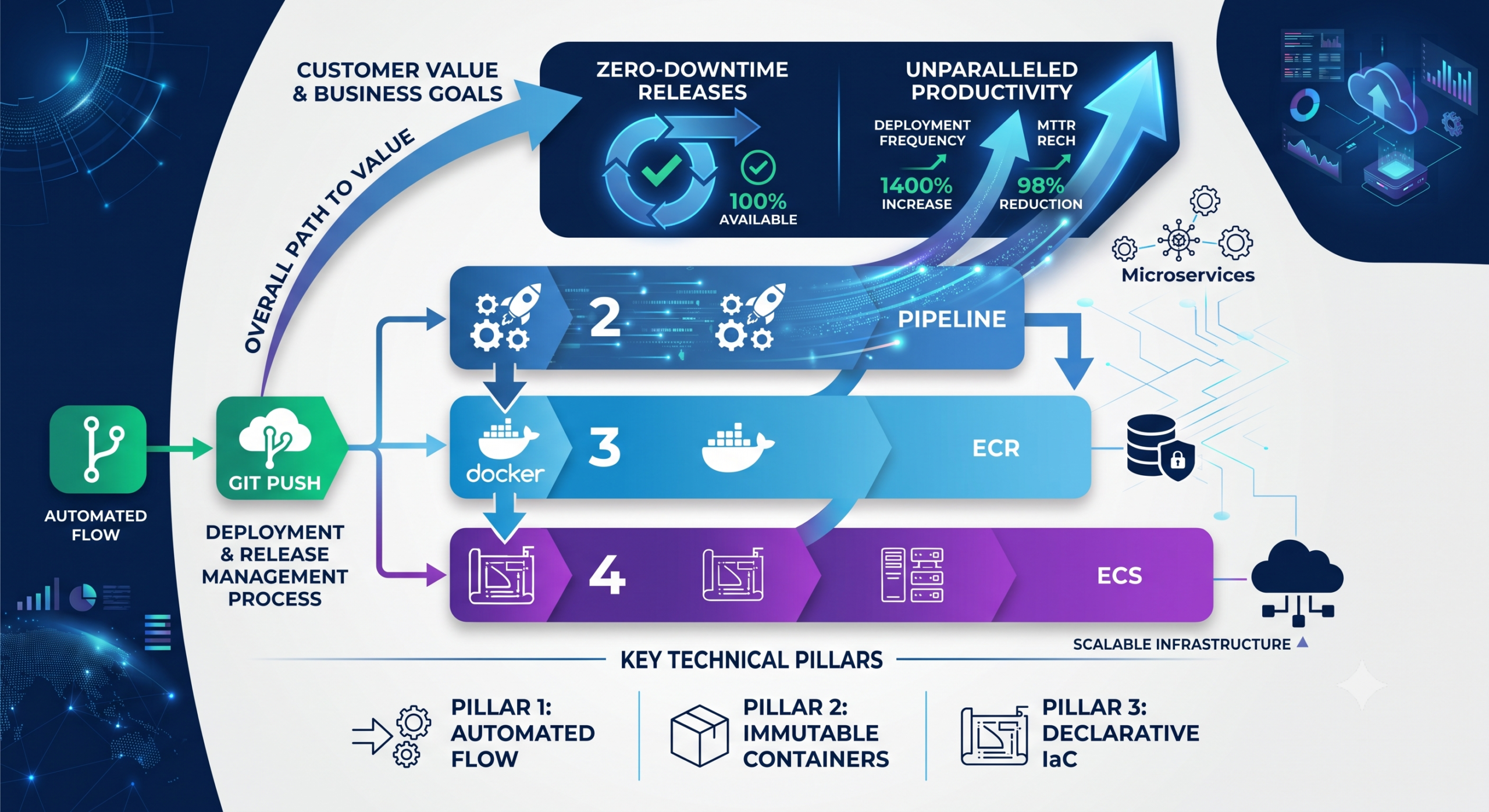
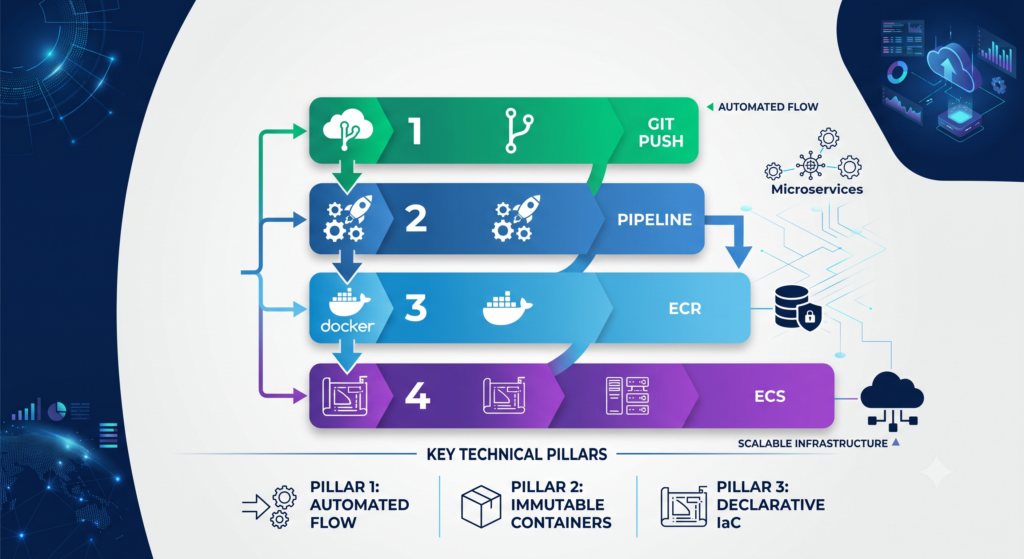
To overcome these constraints, KAP Cloud Solutions designed a fully automated Continuous Delivery & Release Management System structured around four core pillars:
Core Architecture Components
- Infrastructure as Code (IaC): Every infrastructure asset (VPCs, ECS Clusters, ALB Listener Rules, ECR Repositories) is declared using AWS CloudFormation templates to eliminate environment divergence.
- Containerization & Multi-Stage Builds: Multi-stage Docker builds separate build dependencies from runtime dependencies, optimizing container sizes and reducing attack surfaces.
- Multi-Branch Jenkins Automation: Automated build and deployment pipelines trigger based on branch events, deploying seamlessly to designated environments (Development, Staging, or Production).
- Blue-Green Deployment Strategy: Traffic is smoothly shifted between two identical environments (Blue and Green). Traffic only router-switches once health checks confirm 100% successful initialization of the new release.
3. Step-by-Step Technical Implementation
Phase 1: Immutable Container Packaging
To ensure absolute consistency across all release environments, the application is packaged into immutable Docker images using multi-stage builds.
Dockerfile (Angular Frontend + Express Production Runtime)
Dockerfile
# Stage 1: Build Angular Frontend Application
FROM node:18-alpine AS build-stage
WORKDIR /app
COPY package*.json ./
RUN npm ci
COPY . .
RUN npm run build --prod

# Stage 2: Production Container with Express Proxy
FROM node:18-alpine
WORKDIR /app
COPY --from=build-stage /app/dist/angular-app ./dist
COPY server.js package.json ./
RUN npm install --production

EXPOSE 80
CMD ["node", "server.js"]
Phase 2: Declarative Release Infrastructure with CloudFormation
Using Infrastructure as Code ensures that target environments can be dynamically spun up, mutated, or torn down without manual configuration drift.
cloudformation-release.yaml
YAML
AWSTemplateFormatVersion: '2010-09-09'
Description: 'ECS Fargate Release & Deployment Management Blueprint'

Parameters:
  EnvironmentName:
    Type: String
    Default: production
  ImageTag:
    Type: String
    Default: latest

Resources:
  # Container Registry with Automated Vulnerability Scanning
  ECRRepository:
    Type: AWS::ECR::Repository
    Properties:
      RepositoryName: !Sub '${EnvironmentName}-app-repo'
      ImageScanningConfiguration:
        ScanOnPush: true

  # Task Blueprint defining CPU/Memory and Execution Roles
  TaskDefinition:
    Type: AWS::ECS::TaskDefinition
    Properties:
      Family: !Sub '${EnvironmentName}-task'
      NetworkMode: awsvpc
      RequiresCompatibilities:
        - FARGATE
      Cpu: '512'
      Memory: '1024'
      ExecutionRoleArn: !Sub 'arn:aws:iam::${AWS::AccountId}:role/ecsTaskExecutionRole'
      ContainerDefinitions:
        - Name: app-container
          Image: !Sub '${AWS::AccountId}.dkr.ecr.${AWS::Region}.amazonaws.com/${EnvironmentName}-app-repo:${ImageTag}'
          PortMappings:
            - ContainerPort: 80
          Essential: true
          HealthCheck:
            Command:
              - CMD-SHELL
              - "curl -f http://localhost:80/health || exit 1"
            Interval: 30
            Timeout: 5
            Retries: 3
Phase 3: Multi-Branch Jenkins Pipeline with Zero-Downtime Release Logic
The pipeline detects code changes across branches, enforces quality gates, builds images tagged with the exact Git Commit Hash (ensuring traceability), and manages environment releases.
Jenkinsfile
Groovy
pipeline {
    agent any

    environment {
        AWS_ACCOUNT_ID = '123456789012'
        AWS_REGION     = 'us-east-1'
        IMAGE_NAME     = 'production-app-repo'
        COMMIT_HASH    = "${env.GIT_COMMIT.take(8)}"
    }

    stages {
        stage('Checkout & Lint') {
            steps {
                echo "Checkout code for branch: ${env.BRANCH_NAME}"
                sh 'npm ci'
                sh 'npm run lint'
            }
        }

        stage('Security & Automated Tests') {
            steps {
                echo "Running unit testing and vulnerability scanning..."
                sh 'npm run test:ci'
            }
        }

        stage('Build & Push Docker Image') {
            steps {
                script {
                    def ecrUrl = "${AWS_ACCOUNT_ID}.dkr.ecr.${AWS_REGION}.amazonaws.com/${IMAGE_NAME}"
                    sh "aws ecr get-login-password --region ${AWS_REGION} | docker login --username AWS --password-stdin ${ecrUrl}"

                    // Build image tagged with git short commit hash
                    sh "docker build -t ${IMAGE_NAME}:${COMMIT_HASH} ."
                    sh "docker tag ${IMAGE_NAME}:${COMMIT_HASH} ${ecrUrl}:${COMMIT_HASH}"
                    sh "docker tag ${IMAGE_NAME}:${COMMIT_HASH} ${ecrUrl}:latest"

                    sh "docker push ${ecrUrl}:${COMMIT_HASH}"
                    sh "docker push ${ecrUrl}:latest"
                }
            }
        }

        stage('Deploy to Environment') {
            steps {
                script {
                    def envTarget = (env.BRANCH_NAME == 'main') ? 'production' : 'staging'
                    echo "Initiating Zero-Downtime Release to Target: ${envTarget}"

                    // Trigger CloudFormation update with specific release tag
                    sh """
                        aws cloudformation update-stack \
                            --stack-name ${envTarget}-ecs-stack \
                            --template-body file://cloudformation-release.yaml \
                            --parameters ParameterKey=EnvironmentName,ParameterValue=${envTarget} \
                                         ParameterKey=ImageTag,ParameterValue=${COMMIT_HASH} \
                            --region ${AWS_REGION}
                    """

                    // Wait for deployment completion & health validation
                    sh """
                        aws ecs wait services-stable \
                            --cluster ${envTarget}-cluster \
                            --services ${envTarget}-service \
                            --region ${AWS_REGION}
                    """
                }
            }
        }
    }

    post {
        success {
            echo "Deployment and Release completed successfully!"
        }
        failure {
            echo "Release failed! Triggering automated alert and rollback procedures."
        }
    }
}
4. Operational Results & Business Impact
By standardizing and automating Deployment and Release Management, KAP Cloud Solutions transformed the client’s software delivery lifecycle:
| Metric | Before Optimization | After Implementation | Improvement |
| Deployment Frequency | Once every 2 weeks | 10+ times per day | 1400% Increase |
| Deployment Duration | ~3 hours (manual) | ~8 minutes (automated) | 95% Reduction |
| Release Downtime | 15–30 mins / release | 0 mins (Zero Downtime) | 100% Elimination |
| Mean Time to Recovery (MTTR) | ~2.5 hours | < 2 minutes (auto rollback) | 98% Reduction |
| Environment Consistency | Frequent manual bugs | 100% Infrastructure parity | Zero Configuration Drift |
Key Best Practices for Modern Release Management
- Always Tag with Commit Hashes: Avoid relying solely on
:latestDocker tags in production. Utilizing short Git commit SHA tags ensures traceable, reproducible deployments. - Incorporate Health Check Probes: Never route live traffic to a newly deployed container until its
/healthendpoint responds with HTTP 200 OK. - Decouple Infrastructure from Code: Manage server resources, IAM roles, and network parameters using IaC tools like CloudFormation or Terraform.
- Shift Security Left: Embed container image vulnerability scanning (
ScanOnPush) directly inside the automated build phase before artifacts reach staging or production.
